-01-1.png?width=1200&height=238&name=Logo%20-%20Social%20(V001)-01-1.png)
Social media keeps changing fast — and if you're trying to grow your business online, keeping up can feel like a full-time job.
Every month during our Social Media State of the Union, we break down the biggest platform updates, strategy shifts, and content opportunities professionals should know about to stay ahead.
This month, we covered major updates across LinkedIn, Instagram, TikTok, and YouTube, plus actionable content strategy tips and four trending video formats you can start using immediately.
If you're a loan officer, real estate agent, sales professional, or marketer trying to improve your social selling strategy, here’s your April 2026 playbook.
🎥 Watch April's full live session on YouTube here
Jump to: 🚨 Platform Updates You Need to Know | ✅ This Month's Content Tips for Sales Reps, Marketers, and Teams | 🎥 4 Trending Video Ideas to Try This Month | 📚 Resources + FAQs
🎥 Watch the full session on YouTube
🚨 Platform Updates You Need to Know
LinkedIn Confirms Several Major Algorithm Myths Are False
LinkedIn executives recently addressed several long-standing myths around how the platform ranks content.
Here’s what they confirmed:
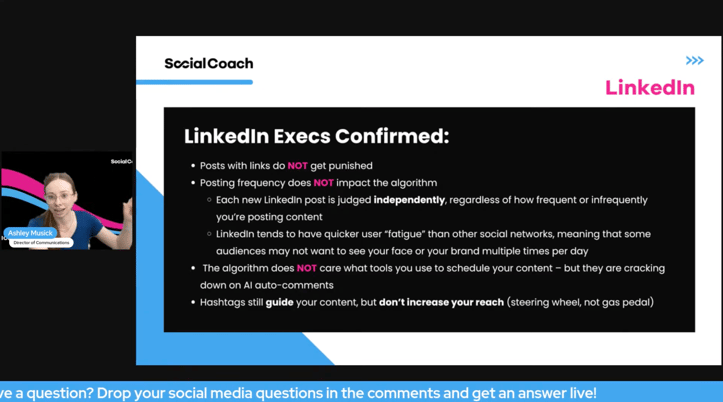
❌ Posts with Links Do NOT Get Penalized
Contrary to popular belief, LinkedIn says adding links to your posts does not automatically reduce reach.
❌ Posting Frequency (Or Lack Of...) Does NOT Hurt Your Reach
Each LinkedIn post is judged independently, regardless of how often you post. Posting more frequently will not “punish” your content.
❌ Scheduling Tools Do NOT Hurt Performance
LinkedIn confirmed the algorithm does not care what scheduling platform you use to publish content. However, they are cracking down on AI-generated spam comments.
✅ Hashtags Still Matter – Just Not for Reach
Hashtags help categorize your content and guide discoverability, but they don’t directly boost reach. Think of them as a steering wheel, not a gas pedal.
Takeaway:
Stop overthinking “algorithm hacks.” Focus on creating valuable content consistently instead.
LinkedIn No Longer Allows Spontaneous Live Streams
LinkedIn now requires users to schedule live events before going live. While you can still schedule them minutes before broadcasting, true spontaneous live streaming is no longer available.
Why This Matters:
LinkedIn wants creators to plan content more intentionally and maximize attendance through pre-promotion.
🎥 Watch this section on YouTube
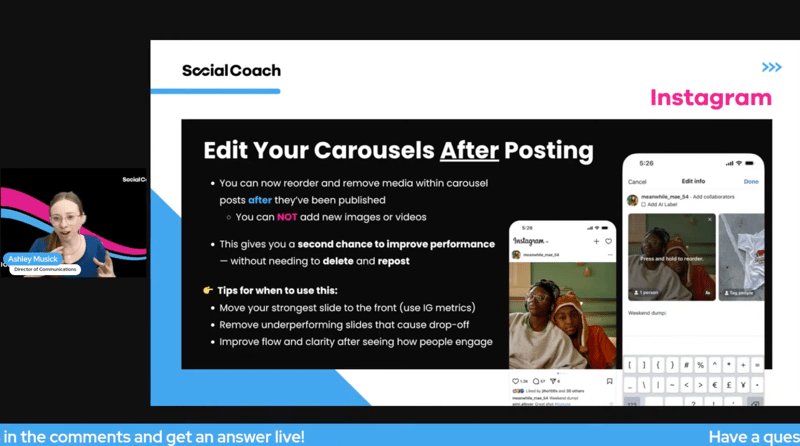
Instagram Carousels Can Now Be Edited After Posting
Instagram now allows users to reorder or remove slides from carousel posts after publishing. You cannot add new media, but you can optimize existing content.
Best uses for this feature:
- Move your strongest slide to the front
- Remove weak slides causing drop-off
- Improve post flow after reviewing engagement data
Users Can Now Pause Instagram Reels
Instagram has introduced one-tap pause for Reels.
What This Means for Creators:
This makes “pause-worthy” content even more valuable.
To capitalize:
- Add stronger on-screen text
- Create educational/tactical content worth stopping for
- Design videos with layered visual/value elements
Instagram Now Allows Linked Profile/Reel Overlays in Videos
Creators can now link profiles and Reels directly inside videos through the Edits app.
Best Practice:
Be careful not to cover captions, subtitles, or important visual elements.
Testing: “Instagram Plus” Subscription
-
Story Extend enables subscribers to extend the life of their IG Stories by an additional 24 hours
-
Story rewatches enables paying users to see how many times their stories have been re-watched in the app, in addition to regular view counts
-
Story spotlight ensures that your Story appears in the first spot of the Stories carousel of their followers
-
Meta is also testing adding a link to their Instagram post captions, with potential limits of 10 links per month
-
Paying users may also get the ability to download Reels for offline viewing
🎥 Watch this section on YouTube
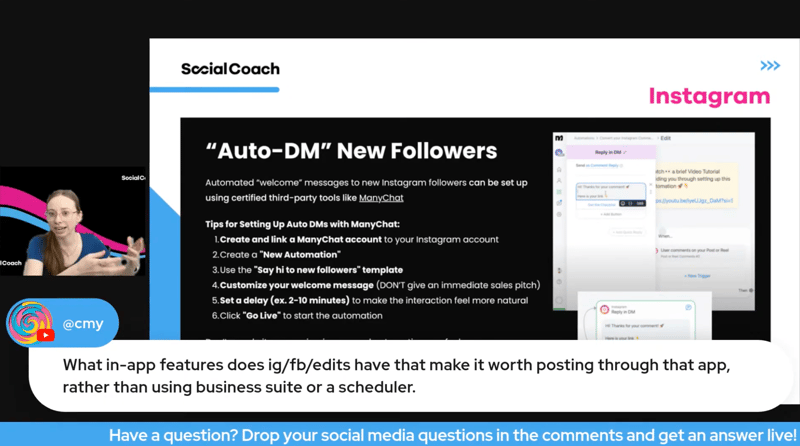
Auto-DM New Instagram Followers with ManyChat
Instagram users can now automate welcome messages to new followers using third-party tools like ManyChat.
Recommended setup tips:
- Use a brief, warm welcome (not a sales pitch)
- Add a 1–10 minute delay to feel more natural
- Keep it conversational and helpful
Warning: Over-automation can feel spammy quickly. Use carefully.
🎥 Watch this section on YouTube
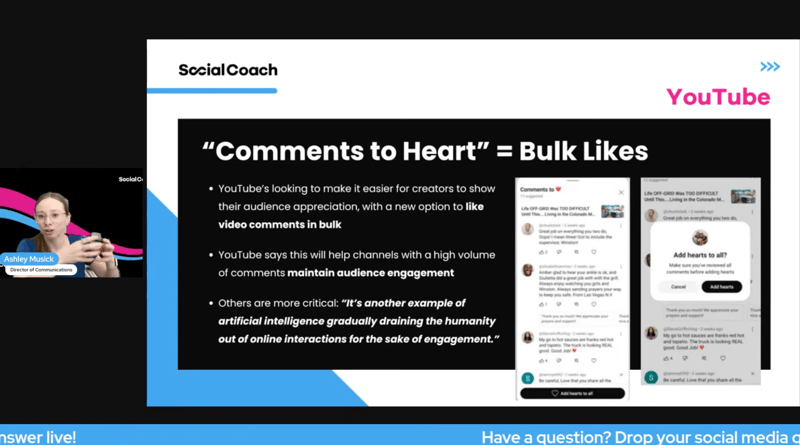
YouTube's “Comments to Heart” Feature = Bulk Likes
YouTube is looking to make it easier for creators to show their audience appreciation, with a new option to like video comments in bulk.
YouTube says this will help channels with a high volume of comments maintain audience engagement.
Others are more critical: “It’s another example of artificial intelligence gradually draining the humanity out of online interactions for the sake of engagement.”
🎥 Watch this section on YouTube
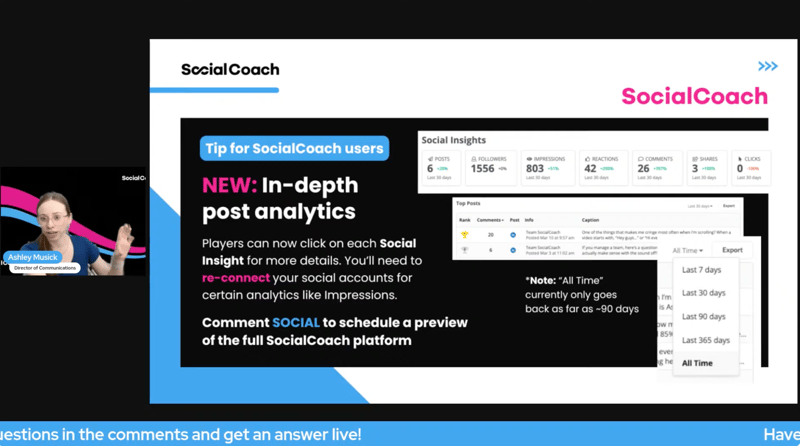
NEW: In-depth post analytics for SocialCoach Player Web Experience
When logged into SocialCoach on the desktop web experience, Players can now click on each Social Insight to view more detailed insights.
*Note: “All Time” begins when this feature was implemented as of Feb 2026. Players may also need to re-connect their social accounts for certain analytics like Impressions to display accurately.
🎥 Watch this section on YouTube
✅ This Month's Content Content Creation Tips for Better Consistency
LinkedIn Feed Is Shifting Toward Topic Authority
Visibility on LinkedIn is increasingly tied to consistent topical authority, not just your network size.
To improve performance:
- Pick 2–3 core topics related to your expertise
- Post and engage around those topics regularly
- Treat every post/comment as a signal of what you want to be known for
Pro Tip:
The platform is rewarding people who build a recognizable niche, not just people with large followings.
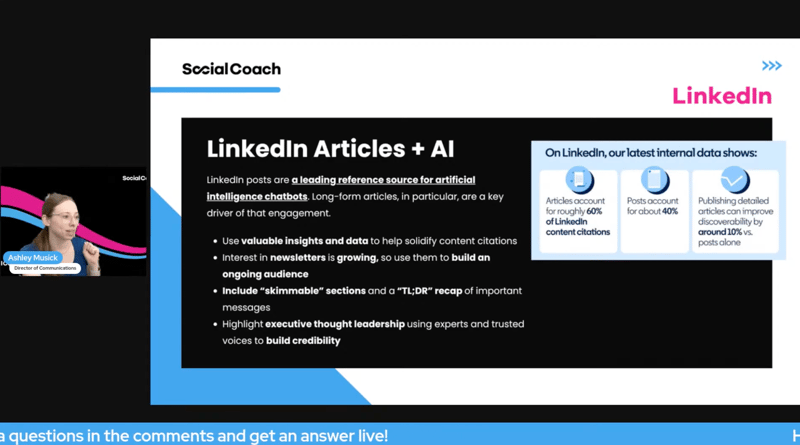
LinkedIn Articles Are Becoming More Valuable for AI Search
LinkedIn posts and articles are increasingly being cited by AI chatbots and search tools as source material. Long-form articles are especially influential.
To improve your discoverability:
- Use valuable insights/data to strengthen credibility
- Format content with skimmable sections
- Include TL;DR summaries
- Leverage executive thought leadership when possible
Why This Matters:
The better structured and more authoritative your content is, the more likely it is to surface in AI-powered search.
🎥 Watch this section on YouTube
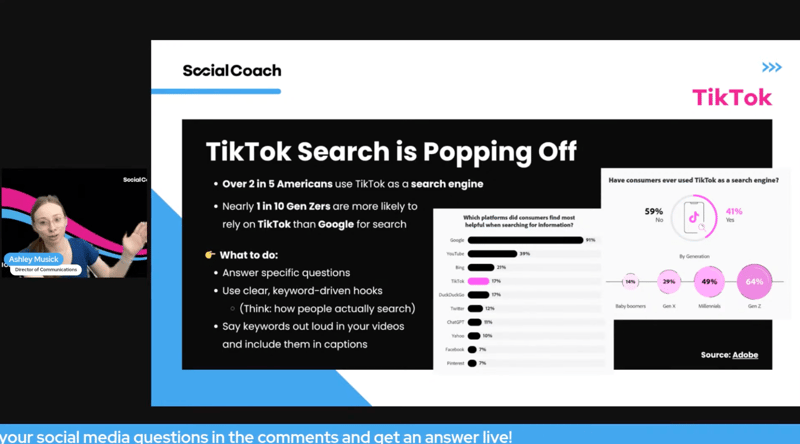
📲 TikTok Search Is Becoming a Major Discovery Tool
TikTok continues evolving into a search engine.
According to Adobe:
- Over 2 in 5 Americans use TikTok as a search engine
- Nearly 1 in 10 Gen Z users rely on TikTok more than Google for search
How to Optimize for TikTok Search
To improve discoverability:
- Answer specific questions people are searching
- Use keyword-driven hooks
- Say keywords aloud in your videos
- Include keywords in captions and text overlays
Example:
Instead of saying: “Quick mortgage tip…”
Say: “How much down payment do first-time homebuyers need?”
The more your content mirrors search behavior, the more searchable it becomes.
🎥 Watch this section on YouTube
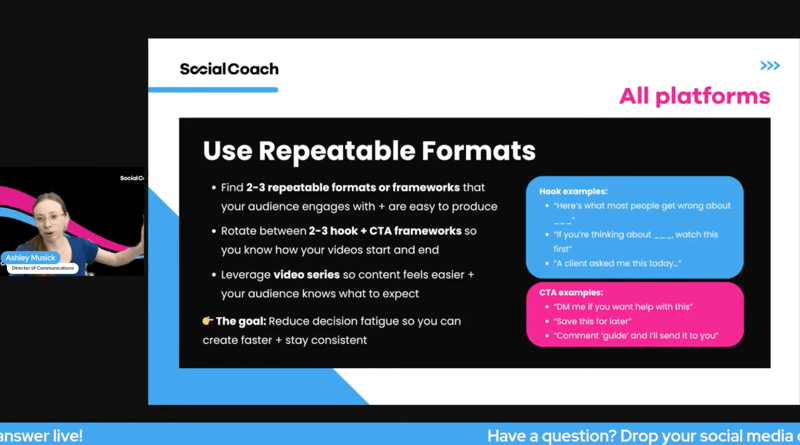
Use Repeatable Content Frameworks
One of the easiest ways to create more consistently is by reducing decision fatigue.
Our recommendation:
- Find 2–3 repeatable content formats your audience enjoys
- Rotate 2–3 proven hook frameworks
- Rotate 2–3 CTA frameworks
- Build recurring video series people expect from you
Example Hook Frameworks:
- “Here’s what most people get wrong about ___”
- “If you’re thinking about ___, watch this first”
- “A client asked me this today…”
Example CTA Frameworks:
- “DM me if you want help with this”
- “Save this for later”
- “Comment ‘guide’ and I’ll send it over”
Why This Works:
When you know how your content starts and ends before filming, creating becomes dramatically easier.
🎥 Watch this section on YouTube
🎥 4 Trending Videos to Try This Month
Need content ideas? Here are four trends for this month that are easy to recreate — and even easier to customize for your audience:
👉 Want a ready-to-use spreadsheet with video examples, audios, and post ideas for all 4 trends? Grab it here — and start planning your next posts in minutes.🎬 Spending too much time editing your own videos?
Let SocialCoach handle it for you — captions, clean cuts, and auto-posting included. See how it works here.
1) The “Jaws” Trend
Use this trend to position yourself as the go-to expert the moment someone expresses a need you specialize in.
🎯 Difficulty level: Easy
How to replicate this trend:
Film one continuous clip with the sound playing out loud. Have someone else film for you, or use a tool like a tripod to prop your phone up at eye-level.
Start off-frame or in the background and slowly cross into the shot as the Jaws theme builds.
Lock eyes with the camera at the payoff moment.
Play it up and go all-out with the humor — the more you commit to the bit, the funnier it lands.
On screen text:
“When you hear someone say they need help with ___”
🎥 View example video
🎵 Use this trending audio
Example ideas:
When you overhear someone say...
-
...they need help figuring out how much home they can afford
-
...they're ready to upgrade to a new home but don't know how they're going to juggle two mortgages at once
-
...they're finally ready to stop renting but don't know where to start
2) “If You’re Looking For…”
Each beat drop reveals a new reason to work with you — making it perfect for positioning yourself as the obvious choice for a specific type of client.
🎯 Difficulty level: Medium (takes coordination with the beat drops!)
How to film:
If you're filming as a team, film one continuous shot.
Start with one person on camera, vibing/dancing lightly to the music.
Then at each beat drop or clap, a new team member enters the frame.
If filming solo, film multiple clips in different locations, and add a transition like a swipe or a clap in front of the camera at the end of each clip to make it easy to transition from one to the next.
On-Screen Text:
If you're looking for...
[Benefit 1] 👏
[Benefit 2] 👏
[Benefit 3] 👏
[Benefit 4] 👏
You're in the right place. ✅
🎥 View example video
🎧 Use this trending audio
💡 Examples (Real Estate / Mortgage):
If you're looking for...
smooth closings 👏
fast pre-approvals 👏
clear communication 👏
a lender who actually picks up the phone 👏
You're in the right place. ✅
If you're looking for...
stress-free showings 👏
honest advice 👏
strong negotiation 👏
someone who actually knows this market 👏
You're in the right place. ✅
3) You're Perfect
Use this trend to speak directly to your ideal client's desires in a way that feels personal and validating — like you were made for exactly what they need.
🎯 Difficulty level: Hard (lip syncing required)
How to film:
- Film a single confident, expressive clip of yourself on camera lip syncing to the male audio and reaction to the female audio.
- Keep it natural and conversational. Film at your desk, office, or clean neutral background.
On screen text:
"I want [client desire]"
"And I want [client desire]"
"And I want [client desire]"
"In / With / At [specific detail]!"
🎥 View example video
🎧 Use this trending audio
Example ideas:
- …that you’re ready to buy a home
- …that it’s finally time to stop renting and start building equity
- …to list your home this spring
- …to talk to me about making homeownership a reality
4) What should you do?
Use this trend to playfully call out the decisions, habits, or moments your ideal client faces — and position yourself as the answer.
The multiple choice format is instantly familiar, highly engaging, and drives comments as people pick their answer.
🎯 Difficulty level: Easy
How to film:
Film a single continuous 15-30 second clip of yourself in a relevant setting — at your desk, walking into a home, or sitting in your office.
You don't need to move much; the text does the work.
Each answer option appears on screen one at a time as the Who Wants to Be a Millionaire music builds.
Feel free to look at the camera and raise your eyebrow as if it's a person and you're waiting to hear their answer.
End on "d) all of the above" as the payoff.
On screen text:
You just [relatable client moment]. Do you:
a) [funny/relatable reaction]
b) [another reaction]
c) call [your name / me]
d) all of the above
🎥 View example video
🎧 Use this trending audio
Example idea:
You just got pre-approved. Do you:a) screenshot it and send it to your mom
b) immediately start scrolling Zillow
c) call me
d) all of the above
You just got an accepted offer. Do you:
a) scream in your car
b) already start packing in your head
c) call me
d) all of the above
🎥 Watch this section on YouTube
💬 Final Takeaways from This Month
Platforms are continuing to reward:
- Expertise over broad content
- Searchability over trend-chasing
- Valuable, pause-worthy content over fluff
- Consistency over perfection
If you want to grow online in 2026, your strategy needs to focus less on random posting and more on creating intentional, repeatable, searchable content.
🗓️ Don’t Miss the Next Live Session!
Join our next Social Media Strategy Session live on Zoom:
🗓️ First Thursday of Every Month
🔗 Register here
Or subscribe to our YouTube channel to watch the replays here.
📌 SHARE this blog post with someone on your team who could use a refresh — and let’s keep winning on social together.
Want Help Creating Social Content Faster?
At SocialCoach, we help professionals simplify social selling with:
- Ready-to-use video scripts
- Done-for-you professional video editing
- Automated posting and scheduling across platforms
- Compliance tools for enterprise teams
If you want help turning strategy into consistent execution, book a demo with our team today.
❓ Social Strategy FAQs:
What is the best social media strategy for professionals in 2026?
The best strategy is creating consistent, searchable, value-driven content around 2–3 core topics tied to your expertise.
Does posting links hurt LinkedIn reach?
No. LinkedIn executives confirmed posts with links are not penalized.
How can I improve discoverability on TikTok?
Use searchable keywords in your hooks, captions, and spoken dialogue while answering common audience questions.
What kind of content performs best on Instagram now?
Educational, visually engaging, pause-worthy content with strong on-screen text is performing well due to Instagram’s new pause feature.
Free Resources:
-
2026 Social Media Content Calendar for Mortgage & Real Estate Pros
- 10 Most Popular Video Scripts for Loan Officers & Agents
📩 Never Miss an Update
Subscribe to The Huddle, the biweekly newsletter for mortgage and real estate pros that delivers the latest social selling tips, trends, and tactics straight to your inbox.
📲 Follow SocialCoach on social media for more weekly tips & tools
🔗 Share this blog post with anyone you know who could use these tips too